A vintage or retro Lightroom preset makes a contemporary photo look like it’s from an earlier era. Vintage effects that mimic the style of analog film add romance and timelessness to modern digital photography. Fortunately, the photo editing tools in Lightroom mean you don’t have to use film equipment or carry out complex Adobe Photoshop actions to take your viewer back to the 1970s. Photos with a vintage look evoke the appearance of faded prints captured decades ago.
Vintage Lightroom Presets now make it easy to make photos look like you shot them in old film. You can get that classic grainy look, elegant unsaturated colors, and soft tones. This aesthetic just instantly adds drama and a nostalgic feel. Even the vintage look comes in different styles. It depends on what film it tries to replicate, or from what time period. We suggest that you try as many as you can so that you can choose the best look for your photos.
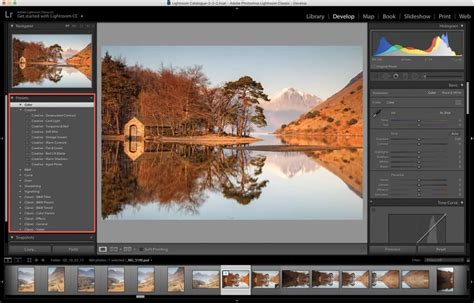
Lightroom includes an extensive preset collection preloaded in the app. Access these free vintage Lightroom presets in the Edit panel in Lightroom Classic, Lightroom CC, or even with a free Lightroom mobile account.
Exploring the Spectrum of Vintage Styles
The free vintage Lightroom presets below are available for Lightroom mobile and desktop, so you can use them completely free using your phone app. Notice that we also indicated our suggestions below each photo as a guide.
- Warm Retro free preset adds beautiful blended warm tones to create a timeless film look. Like most vintage photos, this free preset produces brighter but slightly muted images.
- Warm Vintage free preset coats photos with yellow and brown tones to recreate the vintage aesthetic. Its deep contrasting tones make it unique! We love how attractive its darkened highlights look, too!
- Autumn Vintage free preset is perfect in any autumn picture! It beautifully blends brown fall hues and the signature tones of vintage film.
- 1985 free preset recreates the light magenta tones and pastel blues of 1980’s films. Just look at how it creates a timeless and cinematic look in one go!
- Vintage Architecture free preset creates a vintage feel by applying several adjustments in warmth. We love its blend of tints especially on photos of old intricate architecture.
- Vintage Pop free Lightroom preset that gives photos a vivid vintage aesthetic. It doesn’t wash out colors and tones like many old film presets.
- Vintage Garden free preset brings the muted style of old gardening books to your digital photos. It applies a series of adjustments to colors and tones to recreate the iconic style. The result looks like old prints!
- Kodak Funtime free classic film preset applies a charming retro film effect of Kodak’s single-use camera. We love its light and warm tones that add a cozy, nostalgic, atmosphere.
- Retro Wedding free vintage wedding preset helps you achieve an old film look on wedding and engagement photos. It converts any image into a rich sepia, with deep and well-defined tones. This is ideal if you want to add a vintage film aesthetic on your shots.
- 79th free preset can give any shot a retro feel with its light magenta hues. Its look is close to Polaroid film, but with a light magenta.
- Vintage Ocean free preset adds a violet tint on photos and softens tones. It also has light brown accents to more accurately recreate an old film look.
- Vintage Vixen free preset that creates a warm retro style. The preset simulates the classic light and grainy look of film. We highly recommend it for outdoor portraits.
- Rustic Vintage free preset applies a vintage film camera style. It uses custom color and light settings to create muted yet moody tones.
- This Gypsy Soul preset uses green tones to create a nice serene look. This style is great for outdoor shots or any photo with a lot of natural light. The result you get will also look so charming with its soft matte vintage style.
- Vintage Frame free preset really adds the retro frame that you see in the photo. You get the beautiful, warm, vintage tones, plus that fun old frame.
Premium Collections for a Professional Aesthetic
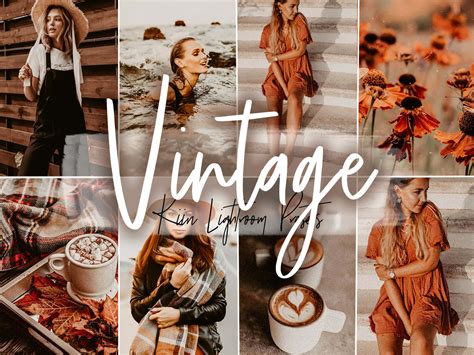
Our friends at KIIN Presets also created these beautiful vintage Lightroom presets below. These sets will definitely give you that professional, influencer, aesthetic. Their styles look amazing on Instagram feeds, too!
- These 7 Vintage premium Lightroom presets have a warm, cozy, vintage feel. They focus on setting a color motif made of browns and deep oranges. They’re amazing on portraits, fashion photography, travel, and even indoors!
- These 3 Hazelnut premium presets have a stylish vintage look that you will just love on portraits and fashion shots. It is so elegant and sophisticated. Just imagine how it looks on an entire social media feed!
- Get that vintage 90’s analog film look with this premium 90’s Vintage preset collection! All bright yellows, reds, and blues are toned to the unmistakable 90’s hues. The preset pack has 7 variations that will allow you to really play around and find your perfect vintage look.
- This gorgeous 1980’s retro preset set will enhance your shots and give them a real retro-chic feel!
Beyond Presets: Understanding the Vintage Look
But while vintage processing effects are popular - if you spend a few minutes scrolling through Instagram, you’re bound to hit upon a vintage image! - there’s not a specific vintage look that all photographers agree on. In this article, I’m going to explain how you might go about creating a vintage look in Lightroom. However, it’s important to bear in mind that my idea of a vintage look might not be the same as yours.
Okay, are you ready to continue? Let me start by explaining my version of a vintage look: Photos with a vintage edit are nostalgic and faded. There may be a color cast or faded blacks, and the images should look like they were taken on film. Note the subtle blue color cast in the shadows as well as the faded blacks.
Creating a Vintage Look Manually in Lightroom
If you came here in the hopes of learning how to create a vintage look yourself, don’t worry. In the second part of this article, I explain how you can create a vintage look from scratch! Yes, you can create a vintage look manually - but if you’re not an experienced editor, it might be easier to buy Lightroom presets or even download some free ones. There are plenty of great vintage-effect presets out there, and when you get a preset pack, you generally end up with a handful of different looks that you can apply to your images.
In fact, all of the presets used for the image above were downloaded for free! They’re a little heavy-handed, but that’s okay; I think the best way to use Lightroom presets is as a starting point. Once you have applied the preset, you can then go to the right-hand panels and tweak the editing settings to get the most out of your photo.
Note that you’ll want to start each edit the way you would start any edit: crop to improve the composition, apply lens corrections, adjust the tone sliders to handle any exposure problems, apply white balance corrections, etc. Basically, get to a point where your image looks nice but stylistically neutral.
1. Fading Blacks with the Tone Curve
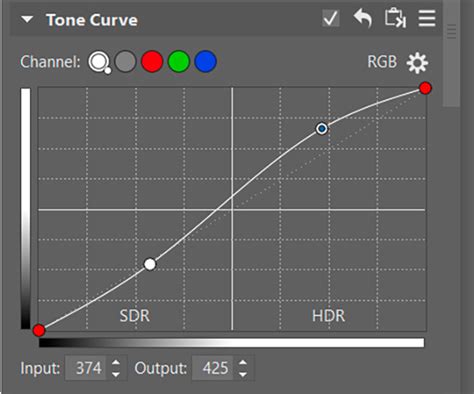
Scroll down to the Tone Curve panel, then click on the point in the bottom left-hand corner (i.e., the left end of the curve). This removes true black from the photo, making the darkest tones lighter to produce a fade effect. How far you lift the curve is up to you. You’ll get the best results when the curve starts from a linear position - that is, when it’s a straight line from bottom-left to top-right rather than a true curve.
To complement the fade effect, you might scroll up to the Basic panel and reduce the Saturation or Vibrance slider to reduce the colors in your shot. This still fades the blacks, but it adjusts the rest of the image less, and the look is slightly different.
Note that using the standard RGB Point Curve applies this fade/matte effect without directly adjusting the colors in your image. However, you can play with the color curves as well. If you use the same fade technique with a color curve, it affects the color of the photo as well as the contrast.
2. Adding Color Cast with Split Toning
Another way to add a vintage color cast to an image is with split toning. The basic concept is simple: You apply a warm color to the highlights (such as orange, red, or yellow) and a cool one to the shadows (such as blue, dark green, or teal). You may be aware that warm colors appear to move toward the viewer and cooler colors appear to move away. Applying a split-toning effect is easy in Lightroom. Then adjust the Shadows and Highlights wheels until you get the effect you desire. Though for a more uniform color cast, you can tweak only the Midtones wheel while leaving the Shadows and Highlights wheels untouched.
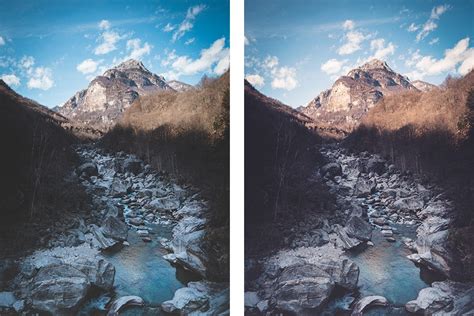
Now that you know how to create a vintage look using Lightroom, go try it for yourself! The two approaches that I’ve shared are simple, but they’ll go a long way toward achieving that filmic, faded look. Of course, as I emphasized at the start of the article, your understanding of the “vintage” look may be different from my own.
A Curated List of Vintage Lightroom Presets
Here is a selection of various vintage Lightroom presets available:
- 20 Vintage Vibe Lightroom Presets - Classic retro filters with warm faded tones, soft grain, and nostalgic film effects. Perfect for portraits, travel, and lifestyle photography.
- 10 Retro Vibes Lightroom Presets - Vintage-inspired filters with warm faded tones, soft grain, and nostalgic film effects. Perfect for portraits, travel, and lifestyle photography.
- 10 Retro Lightroom Presets - This pack is a perfect fit if you intend to have gorgeous vintage-tone pictures!
- 20 Old Money Lightroom Presets - Timeless, sophisticated filters with muted earth tones and vintage elegance. Perfect for luxury portraits, classic weddings, and refined lifestyle photography.
- Retro 90s Lightroom Presets - Vintage-inspired filters with faded tones, soft grain, and nostalgic film effects. Perfect for portraits, travel, and lifestyle photography.
- 10 Analog Film Lightroom Presets - Transform your photo with our premium analog film lightroom presets. These analog film presets will make photo retro vintage, grainy, polaroid, disposable and many more.
- Vintage Lightroom Presets & Photoshop LUTs - Classic retro filters with authentic grain, faded tones, and nostalgic warmth. Perfect for portraits, travel, and storytelling.
- 15 Vintage Cinema Lightroom Presets - Classic film-inspired filters with dramatic contrasts, rich tones, and cinematic depth.
- Vintage FILM CAMERA Lightroom Presets - For dreamers and movie lovers. FILM CAM features authentic film-inspired colors, dreamy tones, and soft grain. This preset collection includes 2 moody and vintage black + white presets.
- Vintage Lightroom Presets - Classic retro filters with warm faded tones, soft grain, and nostalgic film effects. Perfect for portraits, travel, and lifestyle photography.
- Retro Film Lightroom Presets - Transform your photo with our premium retro film lighroom presets.
- 30 Old Days Lightroom Collection - Transform your photos with the Old Days Lightroom Presets bundle!
- 10 Retro Aesthetics Lightroom Presets - Vintage-inspired filters with warm faded tones, soft contrasts, and classic film grain.
Want even more? Download Free Vintage Lightroom Presets to recreate the glamorous atmosphere of the good old days in just a couple of clicks. These Retro Lightroom Presets were designed to add several layers of grain, sepia light, and film simulation effects to your photographs, allowing you to create the perfect look of old times.
Each vintage preset have two formats .lrtemplate and .xmp. Lightroom Vintage Presets can be applied in a couple of clicks in all Lightroom versions: Lightroom Mobile, Lightroom 4, 5, 6. This collection of Free Vintage Lightroom Presets contains pre-made vintage effects that are capable of making any picture look like it was taken by an old film camera.
The main purpose of any adobe preset is to make an image classier and stylish, which is why they are frequently used by photographers and Instagram bloggers.
- When your goal is to create a vintage-looking image by using retro filters or presets, you should focus your attention on adjusting its color palette and saturation. The majority of old photographs aren’t exactly bright and their colors aren’t very saturated. Keep that in mind while picking vintage Lightroom presets for your photos.
- Lowering the contrast of a photograph makes it appear flattered. With the assistance of our vintage presets Lightroom, you can easily adjust the contrast of the pictures to create the needed effect.
- Due to the flawed nature of old color-rendering methods, the colors on retro pictures are usually poorly saturated. You can use our vintage Lightroom preset collection to recreate the faded colors of old photographs and lower the saturation and hues of your images.
The retro style of any photograph shouldn’t only be conveyed by filters in Lightroom, but by the subject matter as well. Such presets work best with landscape photos and photographs of old houses or vehicles. A studio portrait can also look great with a vintage preset, but only if the subject’s makeup and attire are appropriate for the time you’re depicting in your work. Free vintage Lightroom presets can be applied to modern photos too. Since images taken in a studio have professional lighting and props, they can produce some interesting effects when paired with retro presets Lightroom. While they don’t look like old pictures, they always manage to grab the viewer’s attention.
How To Create A Beautiful Vintage Adobe Lightroom Preset!
Inspired by classic retro film, this preset warms the images and mutes the lightest tones. For a literal take on a vintage film look, crank up the age on your photo. Matte photos feature subdued saturation and high contrast for a cinematic look.
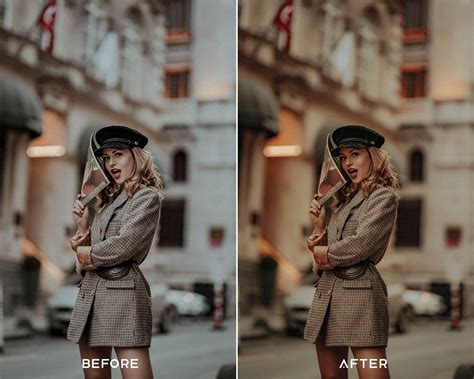
Edit it: Select a photo and click Edit. Set it: Click Presets in the Edit panel. Name it: Select Create Preset, and then enter a name for your preset. If desired, select a group for your preset. Otherwise it will live in the User Presets group.